Skip to content
Operations & hosting

RCON tool

A dedicated, supervised RCON tool for your existing Hell-Let-Loose game server. Browser-based, prepaid and without automatic renewal.

Selection of duration
Prepaid · no automatic extension

9,99 for 30 days

View the scope of services
1 RCON tool instanceA separate administration for your server.
Flexible terms30 days, 3 months, 6 months or 1 year.
No game serversThe tool will be connected to your existing server.
Separate extensionThe runtime ends automatically and remains controllable.
Your server. Your control.

Manage servers without running the tool itself

Frontline takes care of the deployment, updates and stable operation of the RCON tool. You focus on configuration, moderation and your community.

  • Browser-based management and secure RCON connection
  • Player, VIP, Ban and Role Management
  • Logs, status, card rotation and planned tasks
  • Mobile control center and Discord report bot for reports and admin requests
  • Regular updates and technical support
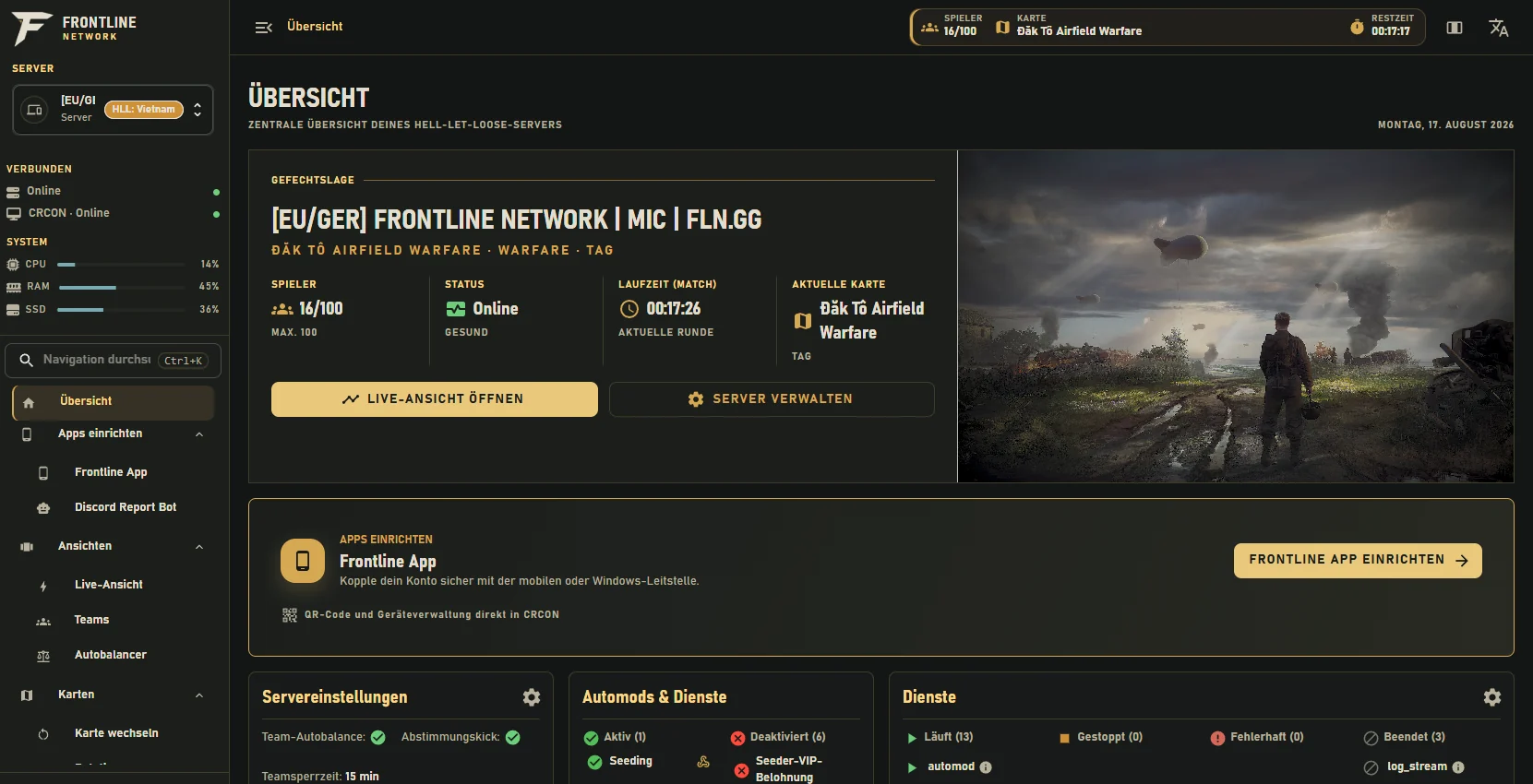
Real overview of the Frontline RCON tool with live status, map, services and server management
Genuine RCON tool interface. Sample view without account data.
Web app & Discord bot included

Server operation does not end on the desktop

The RCON Tool connects the central browser interface with a mobile control center and an Discord Report Bot. In this way, messages with context end up with the right team and can also be taken over on the go.

Mobile web app

Coordination centre on the road

The mobile control center shows open and adopted reports from your connected servers. Administrators see the necessary player context and can also take over processes on the go.

  • A common inbox for all connected servers
  • Open, accepted and completed processes clearly separated
  • Processing optimized for smartphone and web
Included in the RCON ToolNo separate product
Discord Report Bot

Moderation directly in Discord

The report bot passes message reason, player context and available moderation actions to the intended Discord channel. The team continues to work in its usual environment.

  • Accept, reject and log reports comprehensibly
  • Role-based actions such as kick, temporary or permanent ban
  • Direct connection to the current RCON session
Controllable with rollers and channelsSetting up the RCON Tool
Setup

Ready for use in three steps

After the purchase, all next steps and access data are centrally stored in your FLN account.

01

Choose a term

Choose the appropriate prepaid term and complete the order via WooCommerce.

02

Connecting servers

Store host, RCON port and RCON password of your existing game server protected in the customer account.

03

Manage in the browser

Once deployed, you open your own tool and set up roles, rules and procedures.

Before purchase

Clear service scope

You buy a fixed term for the RCON tool. The gameserver remains its own, already existing service.

To the FLN account
Is there a game server included?

No. The RCON tool connects to an existing Hell-Let-Loose game server. Frontline does not sell a game server with this product.

Does the term automatically extend?

No. Each term is prepaid and ends automatically. An extension is deliberately purchased separately.

Are Webapp and Discord Report Bot included?

Yes. The mobile control center and the Discord Report Bot are part of the connected frontline system. The specific activation and role allocation takes place when setting up the RCON tool.

Where do I set up the tool?

After ordering, you will find setup, status and accesses under My Account → RCON Tool.

For which server size is the RCON tool suitable?

The system is suitable for small community servers as well as for highly visited public Hell-Let-Loose servers. Decisive are the released server accesses and the desired scope of care.

Can Frontline also provide the game server?

Yes. A supervised game server can be requested separately and planned together with the RCON tool. This makes it possible to coordinate operations, moderation and technical responsibilities together.

Will my RCON access data remain protected?

The access data is not displayed publicly. Authorisations and responsibilities are limited to the required roles at the establishment.

What happens to technical problems?

First, check the status in the FLN account. In the event of a fault or faulty connection, the support with server reference, time and a short error description helps.

Withdraw from contract